
All content was accurate at the time of publication. Check issuer’s site for most up to date information.
Katiestraveltricks.com has partnered with CardRatings for our coverage of credit card products. Katiestraveltricks.com and CardRatings may receive a commission from our partners. American Express is a Katiestraveltricks.com advertiser. This compensation may impact how and where links appear on this site. This site does not include all financial companies or all available financial offers. Terms apply to American Express benefits and offers. Enrollment may be required for select American Express benefits and offers. Visit americanexpress.com to learn more. For Capital One products listed on this page, some of the above benefits are provided by Visa® or Mastercard® and may vary by product. See the respective Guide to Benefits for details, as terms and exclusions apply.
Southwest Assigned Seating: How it Works
On January 27, 2026, Southwest officially made the switch to assigned seats. Gone is the old system of open seating; everyone now has a seat number before boarding the plane.
This article walks you through how the seat selection process works, what family seating looks like now, how to get free seat selection, and more.
The New Seating Chart
There are now three distinct types of seats available.
Extra Legroom seats are located at the front of the plane and in the exit rows.
Preferred seats are basic seats with a premium location towards the front of the plane.
Standard seats are basic seats in the back section of the plane.

Selecting Seats if You Have a Southwest Credit Card
Southwest cardholders all receive seating benefits. The exact type of seat you can choose and when you can choose it vary depending on the card you have. You’ll get these benefits no matter how you pay for your ticket — as long as you are a cardholder and your Rapid Rewards number is added to your reservation.
Here’s a breakdown of the different cards and what seating benefits they offer:
| Southwest Rapid Rewards® Plus Credit Card | Southwest Rapid Rewards® Premier Credit Card | Southwest Rapid Rewards® Priority Credit Card | Southwest® Rapid Rewards® Premier Business Credit Card | Southwest® Rapid Rewards® Performance Business Credit Card | |
|---|---|---|---|---|---|
| Annual Fee | $99 | $149 | $229 | $149 | $299 |
| Seat Selection | Standard seat 48 hours before departure | Standard or preferred seat 48 hours before departure | Standard or preferred seat at booking. Upgrade to extra legroom 48 hours before departure, if available | Standard or preferred seat 48 hours before departure | Standard or preferred seat at booking. Upgrade to extra legroom 48 hours before departure, if available |
If you’d like to learn more about the Southwest cards, we have a Southwest credit card guide that compares all of the cards in more detail.
When you go to book your flight, the Southwest website makes it easy to see what benefits you get as a cardholder.
As a Southwest cardholder, you get seating benefits no matter what fare class you book. Even when booking the lowest fare class (Basic), credit card seating benefits still apply. This screenshot is for someone with the Priority card (highest level of benefits).

With the cardholder seating benefit, you can choose seats for yourself and up to 8 passengers traveling on the same reservation.
Selecting Seats if you Book for Someone Else
You can use your Rapid Rewards points to book a trip for anyone, which is great.
If you book a trip and you are not flying on that reservation, having a Southwest credit card will not allow you to select seats for the people who are flying. Even if you pay the taxes and fees with your Southwest credit card. To get the seating benefits, the primary cardholder must be traveling on the reservation.
However, if one of the people flying holds their own Southwest credit card, they can log into their account and select seats for everyone in the group after booking (up to 8 passengers).
Companion Pass Holders: Seat Selection for your Companion
As a companion pass holder, Southwest cardholders can also select a free seat for their companion.
When you add your companion, you will be able to select their seat for free at that time (or 48 hours before departure, depending on which card you hold).
Before you add a seat for your companion, make sure you know where your own seat is. This is important because when you go to select a seat for your companion, the system won’t tell you where your seat is.
When you select your own seat, make a note of it. That way, when you go to choose a seat for your companion, you’ll be able to choose a seat next to yours.
Families with 2 Companions
Some families have 2 Companions (one per parent) but only have one parent with a credit card that allows them to select seats at time of booking.
Or some families might have only one person with A-List Preferred, but another person with a Companion. In order for everyone to enjoy the highest level of benefits, you need to follow these steps:
- Book a reservation for all people who will be flying together except the companions. It doesn’t matter whose points you use or whose account you’re logged into when you book, but everyone should make sure to input their Rapid Rewards number to link their reservations to their benefits.
- You might not be able to select seats at the time of booking, depending on which account you’re logged into. Don’t worry.
- After confirmation, add all companions to the reservation. Sometimes, when adding a 2nd companion to a ticket, it only works from a computer to do that. It used to only work from the app for the 2nd companion, but currently, the app won’t accurately display companion info for 2+ companions. You might not be able to select seats yet. Don’t worry.
- Log into the person’s account who has the highest level of benefits (most expensive credit card or highest A-list status). Find the reservation and select seats for all people who you see. Make a note of the seats.
- Wait 5 minutes.
- Pull up the Companion tickets (find the confirmation numbers in your emails) and click “Upgrade your seats.” It should now let you select seats for free.
- You did it! Celebrate.
What Happens if You Cancel your Card?
If you cancel your Southwest credit card, any free seats you’ve selected will be released. This is something to keep in mind when making a reservation. If you’re planning to cancel your card before you take the trip, it could be worth booking a higher fare class that includes seat selection. More on that below!
Another option is if someone else traveling with you still has a Southwest credit card, they can log into their account and reserve seats for the group using their card benefits.
Selecting Seats if You Hold A-List Status
A-List
Customers who hold A-list status are able to select a standard or preferred seat at the time of booking. Even when booking the Basic fare class.
A-List customers can upgrade to an extra-legroom seat 48 hours before departure, if one is available.
A-List seating benefits can be used for up to 8 people traveling on the same reservation. It doesn’t matter who books the ticket, as long as an A-List member is on the reservation, they get seating benefits. Make sure to attach your Rapid Rewards number to the reservation; that’s how you’ll get seating benefits!
A-List Preferred
A-List Preferred customers get even more perks. If you hold this level of status, you can select an extra leg-room seat for free at the time of booking. Like with A-List, this benefit applies to up to 8 people traveling on the same reservation.
A-List Preferred customers are also guaranteed to board no later than group 2.
Selecting Seats if you do NOT Have a Southwest Credit Card or A-List Status
If you don’t have a Southwest credit card or A-List and you want to be able to choose your seat for free, book a Choice fare class or higher.
The Choice fare allows you to select a standard seat for free at the time of booking.

The Choice fare class comes with several other benefits as well, such as earlier boarding time, free changes, and a further expiration date for flight credits if you need to cancel your flight.
(If you cancel a Basic fare flight, your flight credit will expire 6 months from the original booking date. If you book Choice or higher, flight credits expire 12 months from the booking date.)
Pay to Select a Seat
You can also opt to pay for a seat, either during the booking process or at any time after you’ve made a reservation.
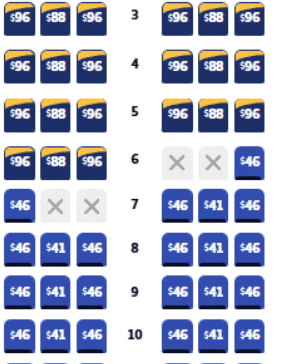
Anyone can opt to purchase a Standard, Preferred, or Extra Legroom seat as long as they are available, regardless of the fare class booked. Prices vary depending on the seat location, route, dates, etc.
What Happens if I Don’t Select a Seat?
If you don’t select a seat, one will be automatically assigned to you at check-in. Customers who book the Basic fare class will be automatically assigned a Standard seat in the back section of the plane.
There’s no guarantee that parties will be seated together.
Family Seating
Southwest does not guarantee that families will be able to sit together. They encourage you to select seats at booking if you want to ensure you’ll be seated together.
The official policy says Southwest “will endeavor to assign a child (age 12 and under) a seat adjacent to one accompanying Passenger (13 and older) to the extent practicable and at no additional cost.”
If you get to the gate and you don’t have seats together, you can ask a gate agent or flight attendant for help, and they will do their best to make sure each child is seated next to at least one adult. If that’s not possible, they can move you to the next available flight with seats together if you wish.
You can read more about the Family Seating Policy on Southwest’s website.
Family Boarding
Family boarding is no longer offered. Everyone is assigned a boarding group between 1-8. Families will board together with the rest of their assigned boarding group.
If you need extra time, you can purchase priority boarding. Priority boarding goes on sale 24 hours before flight departure.
Refunds and Exchanges for Seat Fees
Canceling a Paid Seat
Once you’ve paid for a seat, the only way to cancel that seat reservation is if you cancel the entire flight. If you do cancel the flight, you’ll receive a flight credit for the cost of your paid seat.
Exchanging a Seat
You can exchange your seat for a different one as long as space is available. If you choose a new seat that costs the same or less than your original seat, no refund is given for the price difference.
If you move to a seat that costs more than your original seat, the way it works is you’ll purchase the new seat, and then you’ll automatically receive a refund to your original payment method for the cost of your original seat (in most cases).
The exception is if your original itinerary had connecting flights with a paid seat on each flight, and you switched to a non-stop flight with only one seat to select. In that case, only one of the original seats would be automatically refunded, but you could contact Southwest to request a refund for the second seat.
How Important is it to Select Seats Ahead of Time?
Some of the Southwest credit cards allow you to select a free seat at the time of booking, but several of them only allow you to choose seats 48 hours ahead of your flight.
It’s hard to tell at this point if 48 hours will be enough time to get seats together as a family. It may turn out that there are still plenty of seats to choose from 48 hours ahead of time, but on popular routes or busy times of the year, there might not be.
For now, if you want to guarantee that you’ll be able to sit together as a family, it’s a good idea to select seats ahead of time.
Keeping up with the Southwest Changes
There sure have been a lot of changes with Southwest this year! Check out our master post on all the Southwest Changes to stay up to date with what’s happening.
For more info on earning a Companion Pass, we have a Companion Pass Guide that walks you through the whole process. If you’re interested in earning a pass this year, don’t miss the updated timeline for earning a Companion Pass in 2025.
Table of Contents
Related Posts


Responses are not provided or commissioned by the bank advertiser. Responses have not been reviewed, approved or otherwise endorsed by the bank advertiser. It is not the bank advertiser’s responsibility to ensure all posts and/or questions are answered.

thank you. this is very helpful
Do you happen know what happens if you select a seat at booking for a future flight and then cancel the credit card that allowed you to select the seat before said flight? For example, I’m planning on booking flights now for springbreak next April. But, before that April flight I will be cancelling the southwest credit card that allows me to select a seat at booking. Thank you!
Good question! If you cancel the card, your reserved seats are released. I’ll add this info to the post.
If I’m working toward 2 people/3 card/2 companion pass in Jan 2026 – should I only have one rapid rewards number? Or would I have 2 numbers? and how do I arrange booking then?
Each person opening cards and earning a Companion Pass needs their own Rapid Rewards number. When it comes to booking you will be able to book using your points for anyone you want!
If we are a family that holds two companion passes can we all book under the same reservation and still designate a companion for both me and my husband? That way we can hold one premium card in our family and select seating for all of us. If we have to book separate reservations to designate our companions, both my husband and I will need to hold our own premium card or book Chouce fares to select seats, correct?
Yes, you can! You can book it all together. And then go back and each add your Companions. Sometimes the 2nd person adding a companion has to do it from a computer, sometimes the app can’t handle it. If only you held a premium card but your husband used his points to book the flight, you’d have to (1) book the flight from his account and then (2) log in to your account after the booking to select seats and then (3) add companions and select seats
If I have the performance business card, should I be buying the basic fare or the choice fare? My goal is to get preferred seating.
With the performance business card, you can select a preferred seat at the time of booking. It doesn’t matter what fare class you book, you get the card benefits either way!
how do you pay for a seat selection with a seat credit from a cancelled trip??
I believe seat credits would just be issued back to form of payment.
Basic or Choice?? using points and have a companion pass (me) also have SW plus CC (me) spouse has SW business premiere card. Should I book the basic fare and then 48 hours before try upgrading to assigned seat?
it’s up to you, how much you value picking the seat further in advance!
Basic fare with SW plus CC and Rapid Rewards…. I can choose my seat 48 hours out (if I’ve read it right), do I then have t chech-in 24 hours out OR is the seat choosing also considered check-in? Thank you.
You have to do both!
I have the SW Priority Card and will receive my companion pass shortly. We are flying in June and I want to know if I book my flights and choose my preferred seat now and then add my husband with the companion pass and 48 hours before our flight I can upgrade my seat to an extra legroom seat, will I be able to move my husbands companion pass seat too? Thanks!
Yes! You will be able to do that!
I don’t think your chart is correct or you may want to modify it to make it clearer. You can reserve seats at booking with the plus or preferred card in Choice or higher fair class. You cannot reserve a seat if you purchase basic fair. I learned this when I booked flights last month. With the priority card, you can reserve seats at booking in basic and higher fair. So, as a plus card holder, I have to choose Choice fair to select my seat. It isn’t that much more and worth it to book Choice. Also, I found out that CP gets 2 free bags while the person who earned CP only gets one due to a glitch in their system.
I believe the Chart is correct but I see what you mean. The fact is that anyone, no matter if they have any card at all gets to pick a seat if they book Choice fares or above! So that’s why that isn’t included on the chart. But we can add a disclaimer to make that more clear!
bought basic fare, 2 1/2 hour flight. doesn’t really matter where we sit or if we sit together. are we still guaranteed a seat on the plane or is there more of a chance we get bumped if it’s oversold.